
EdenSpark Update 1.1
Editor and assets
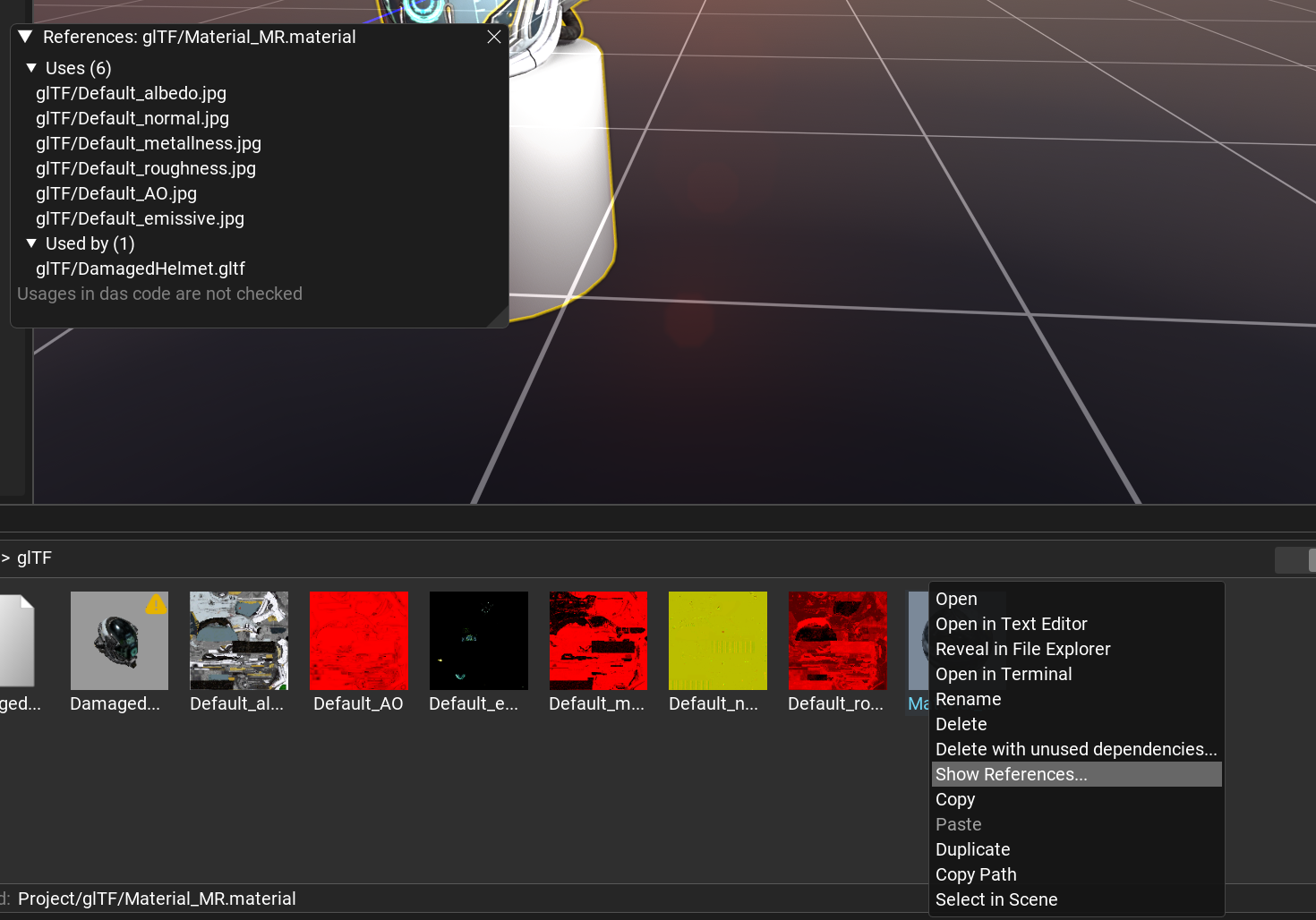
The editor now knows which assets use which. "Show References..." in the context menu of the Project panel shows the assets that an asset uses and the assets that use it.
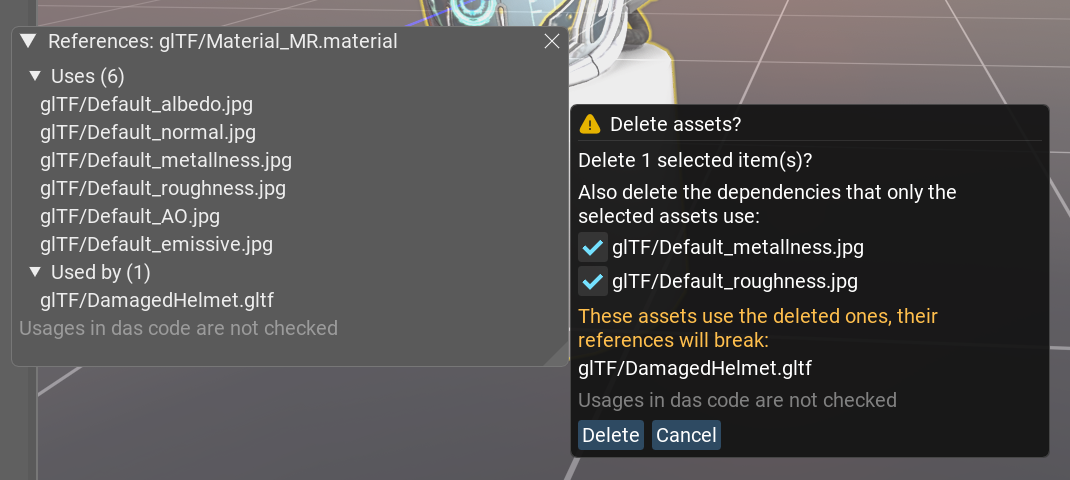
Before a delete, the editor warns when other assets still use the assets that you delete. "Delete with unused dependencies..." also deletes the assets that only the deleted ones use.
Memory profiler
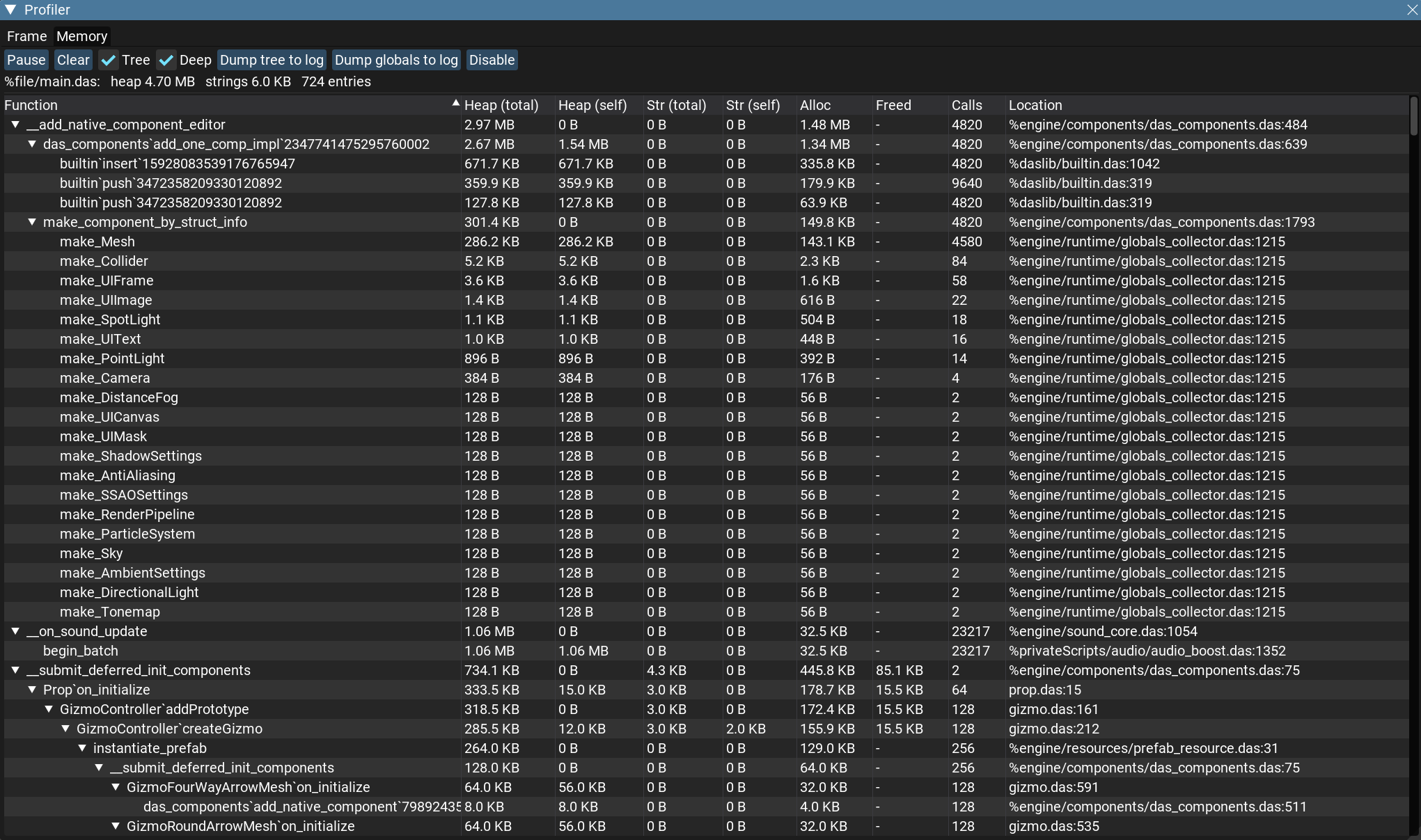
The Profiler window has a new Memory tab: it shows which script functions use the script memory, so you can see why it grows.
Turn it on from the Profilers button in the toolbar, which also holds the Daslang Profiler. It slows the game down, so keep it on only while you look.
Model generators and CSG
A script can now generate a whole model, not only one mesh: several meshes and materials, a node tree and colliders. The result is a normal prefab - place it like an imported model.
Build the geometry with CSG - add and cut boxes, cylinders and other shapes. Faces keep their look (paint, chrome, matte, glass, metal) and color, so a CSG model comes out with its materials.
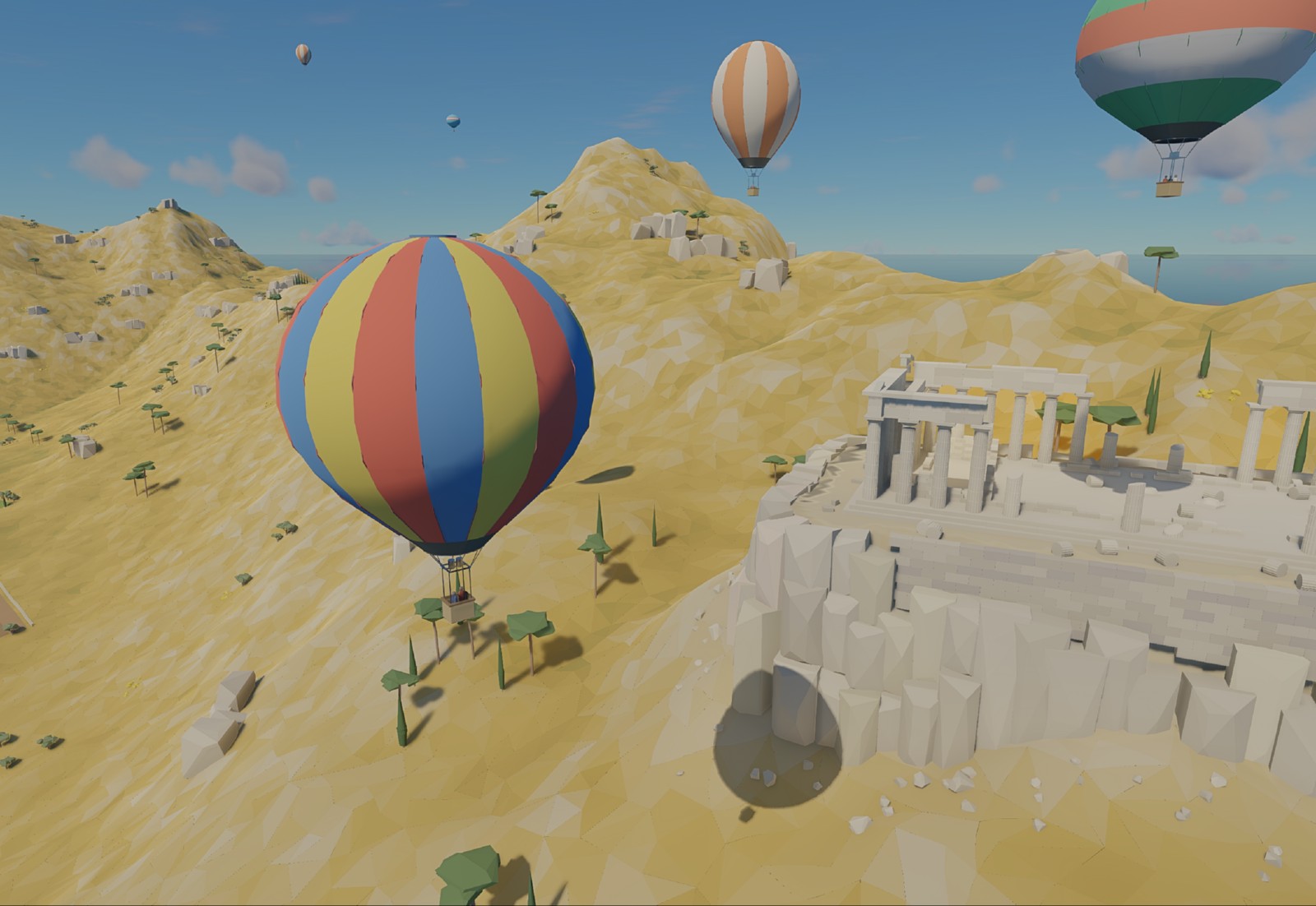
The new balloons sample is a balloon festival over a Greek island. The project stores no mesh: the terrain, 56 balloons of 10 kinds, the ruins, the fields and the trees are built by generators when the game starts, in about 15 seconds.
You do not wait for a model: instantiate_prefab takes the id that generate_model returns at once. The instance is an empty node, and the model comes into it when it is ready.
Generators reload while the game runs. Save a generator, or a file that it requires, and its meshes and models are built again in place - the game does not restart, and the nodes keep what the game added to them.
See "Model generators" in the docs.
Native user shaders on Windows
On Windows, user shaders (.shader files and shader graphs) now compile to native GPU shaders. Before, a shader interpreter ran them. Native shaders are on by default with DX11, DX12 and Vulkan, for materials and post effects.
Post effects on user shaders render much faster: about 14 times faster with DX12, 18 times with DX11 and 50 times with Vulkan (median of the 12 effects of the post effect sample).
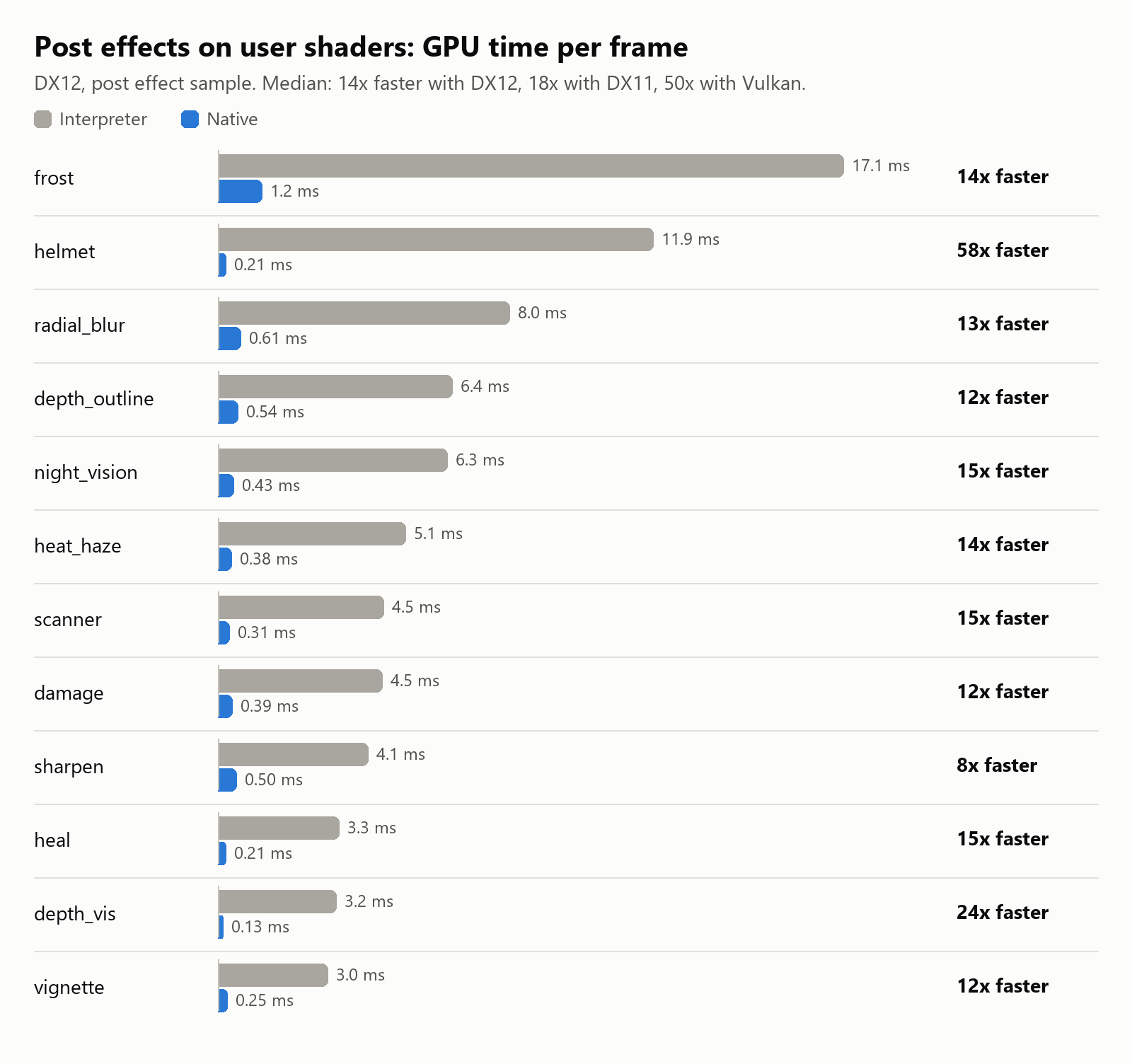
The shaders build in the background, so a game starts as before: until the build is done, the interpreter draws them. The next start loads the shaders of the last session at once. When you edit a shader in the editor, the build takes about 2 s and the scene changes in place, with no restart.
NavMesh Covers
NavMesh can now find covers: walls and obstacles that an agent can hide behind, such as a wall between the player and an enemy.
Covers are found during the NavMesh baking process. This makes the bake much slower, so it is off by default.
Multiplayer: client prediction and reconnect
Two things a network game had to write by hand are now in the engine. Client prediction: you declare the input of a player and how it moves a node, and the engine sends the input, moves the node on the client at once, corrects it to the server and hides the correction. Reconnect: a player who loses the connection comes back to the game, at the place where the server kept it.
The Net Ships sample showcases both features.
Faster start, smoother frames, less memory
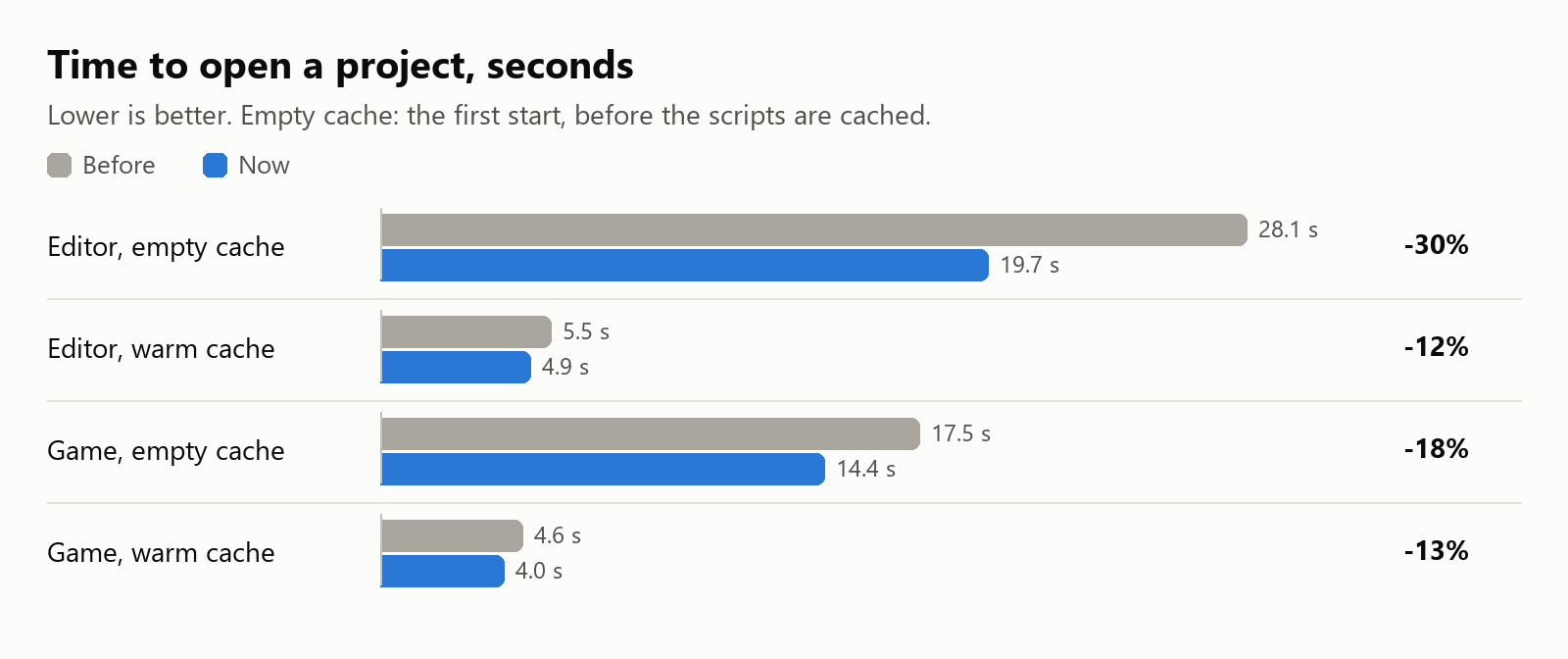
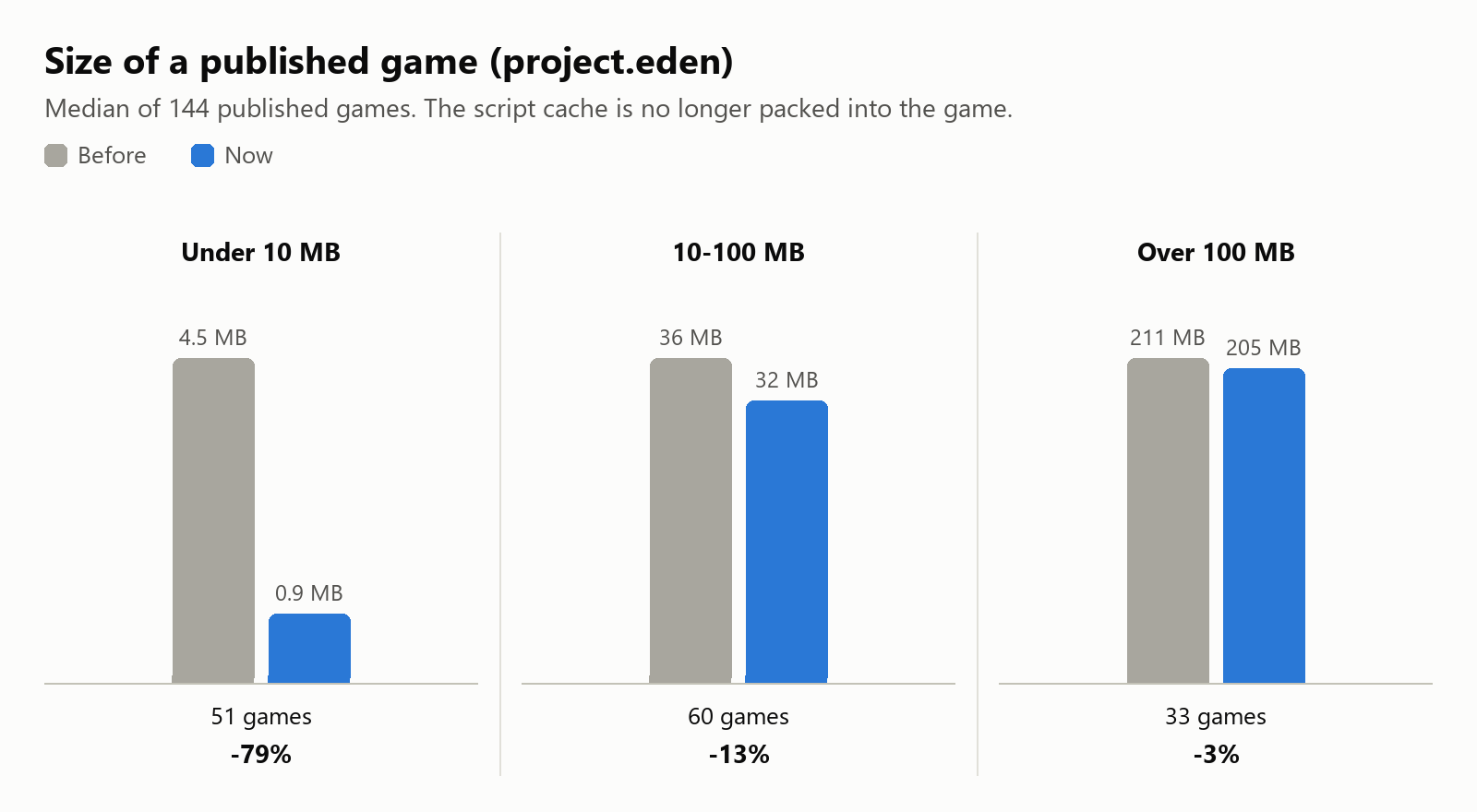
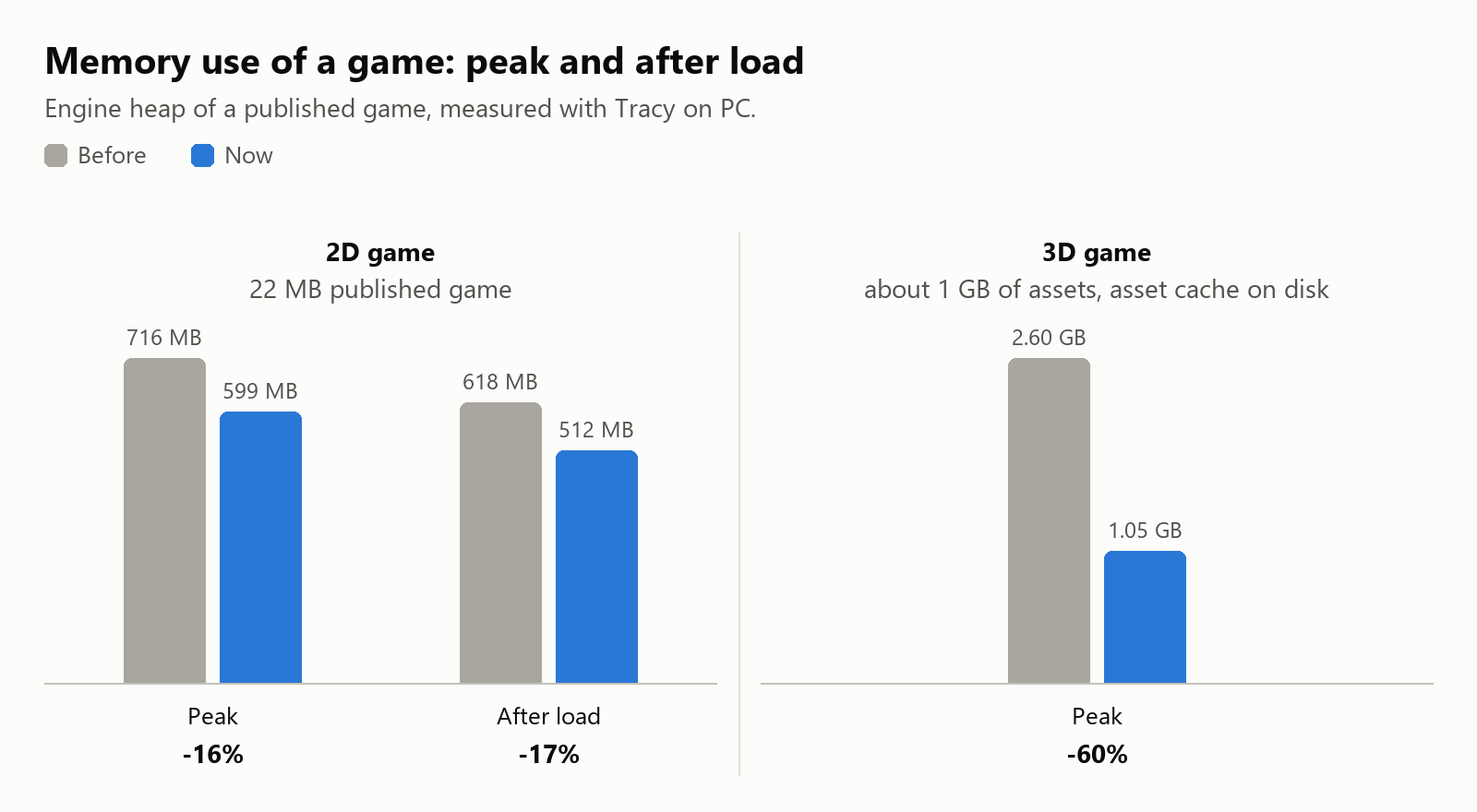
This update makes EdenSpark faster and lighter. The editor opens a project in about 20 s instead of 28 s, frames stall less while assets load, published games use hundreds of MB less memory, and small games download several times faster.
New User Menu
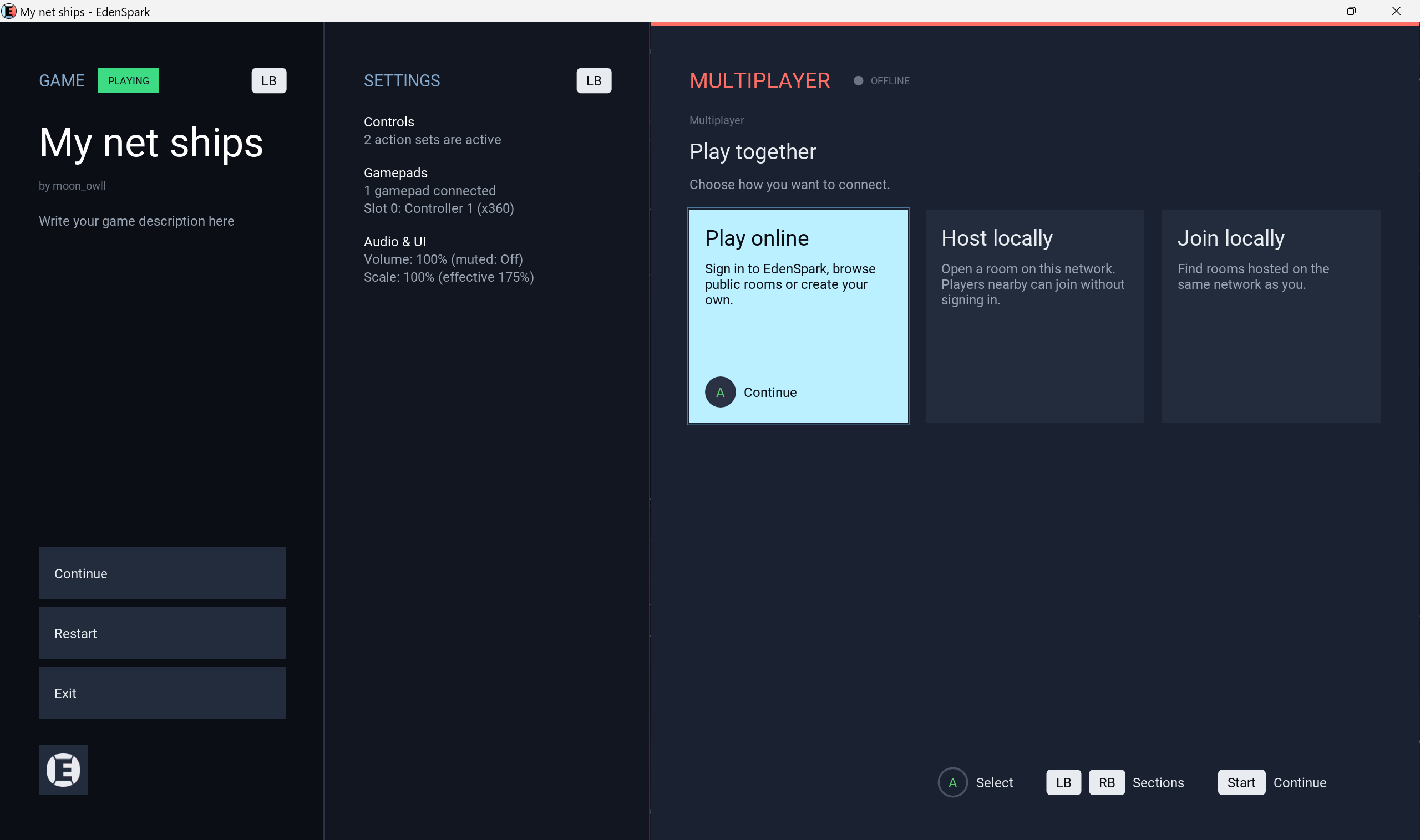
The user menu has a new design. Press Esc (or Start on a gamepad) and the game dims behind three columns: Game, Settings and Multiplayer. The active column you use is wide and marked with an accent bar, and the other two stay narrow, so you always see where you are. Switch columns with Q/E on the keyboard or LB/RB on a gamepad, and use the whole menu with a mouse, a keyboard or a gamepad. A bar at the bottom shows the keys or the buttons that work now, and it changes to match the device you used last.
The Game column shows the preview, the description and the state of your project (playing, paused or stopped), with Resume, Restart and Exit close at hand. If the game stops on an error, the menu opens on this column and shows what went wrong. The Settings column has new, clearer rows for controls, gamepads, audio and interface. The Multiplayer column leads you from the choice of connection to the list of rooms and into the room, where you see who is there, who hosts and who is ready, and where the host can start the match or remove a player.
Gamepads got the most work. The new picture of a gamepad shows each button and stick as you press it.
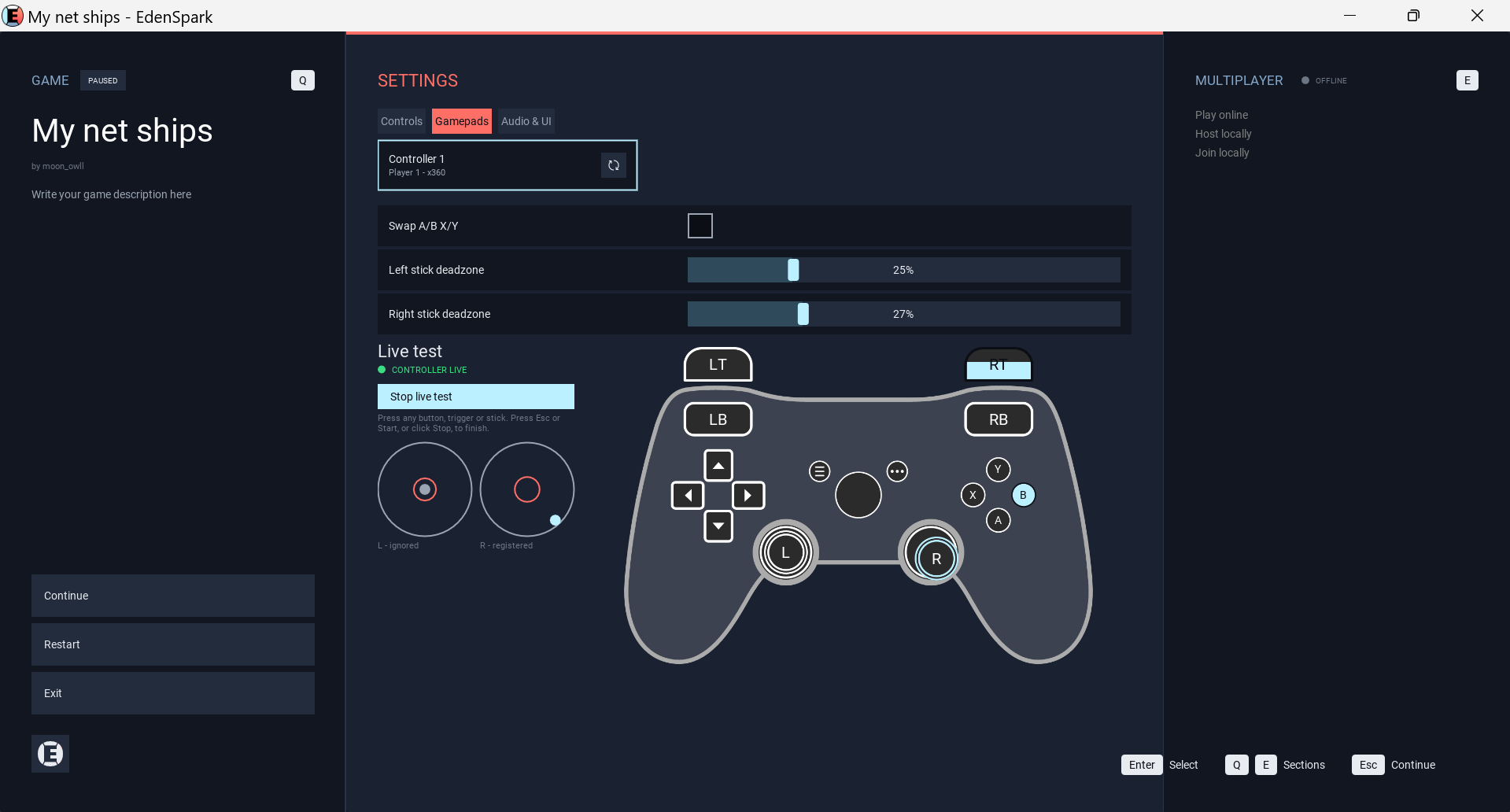
Use it to test a pad when you want to, and nothing else reacts while the test runs, and "Swap A/B X/Y" now flips all four face buttons. Each gamepad has its own reset button. Recording a key binding is also simpler: hold the modifiers, press the key, and the full combination (for example "LCtrl + LShift + A") is saved in one step.
Distortion particles
The ParticleSystem component now has a Distortion render mode, which lets you create refraction effects with optional blurring, such as heat haze, water droplet refraction or any other phenomenon you can imagine. It works in both render pipelines.
UILayer
A new component, UILayer, was added to the UI primitives, allowing you to define an explicit order for your UI elements. It's especially helpful for overlay elements such as popups, dropdowns or hints.
ParticleSystem hot-reload
Now when you edit a ParticleSystem component, it continues playing without resetting, letting you see the changes instantly for a faster and more pleasant workflow.
In some cases, when certain parts of the system get turned on or off, the hot reload may fail, but the particles continue playing with a smooth transition into the new configuration.
The feature can also be used in gameplay for continuous updates of particle systems, but each such update rebuilds the system data, which can be expensive if done on too many effects at a time - profile your game.
📐 API Changes
Model generators and CSG
Put generator scripts into a generators folder: they are not compiled into the game, so they can use the CSG modules without breaking the game compile. A game script that already is in a folder with this name must move out of it.
// generators/crate.das
options gen2
require csg
require scene
require engine.gen_geometry.model_structures

[model_generator]
def crate(size : float = 1.0) : Node {
    return node("crate", box(size, size, size).rgb(0.6, 0.4, 0.2)).collider(box_shape(size = float3(size)))
}

// main.das
let crate = instantiate_prefab(generate_model("%file/generators/crate.das", (size = 2.0)),
NodeData(position = float3(0, 1, 0)))- A collider is explicit: .collider(shape) on a CSG node, or ModelNode.shapes in a script model. A node with no shape has no collider. Shapes: box_shape, sphere_shape, cylinder_shape, capsule_shape, mesh_shape, convex_shape.
- on_ready of generate_model is optional. It gets the prefab, or PrefabId() if the generation failed; the error is in the log.
- A module-level var of a generator is fresh on every run.
Multiplayer: client prediction and reconnect
Client prediction
[controls]
struct ShipInput {
    thrust : float
    turn : float
}

[predicted(controls = ShipInput, sync = (RigidBody, Collider))]
class Ship : Component {
    def on_collect(var input : ShipInput) {       // the owner fills the input
        pass
    }
    def on_step(input : ShipInput; dt : float) {  // the server and the owner move the node
        pass
    }
}

// server: add_component(node, new Ship()); set_node_owner(node, connection)
Keep all that on_step reads and writes in replicated (not private) fields, and clamp the input: on the server it comes from a client. A node with a RigidBody is predicted approximately. The full rules are in the Networking page of the docs, "Controls and prediction".
Reconnect
// server (dedicated.das), in on_initialize: set_reconnect_grace_msec(30000)

[net_event_handler(client_reconnected)]
def on_join(conn : ConnectionId, userId : uint64, name : string) {}   // reconnected: the nodes of the player are owned by new conn again

[net_event_handler(client_expired)]
def on_gone(userId : uint64) {}    // the player does not come back: remove the nodes here
Key the state of a player on userId, not on the connection. A kicked player is not kept.
Sound
Sound handles have their own type now, not a plain 64-bit integer. Store them in that type:
var music : SoundHandle // was: uint64
Old code that keeps handles in integers still compiles, with a deprecation warning.
✨ Added
- AI agents can play the game with a virtual gamepad.
- get_asset_errors gives asset build errors and warnings (for example a shader that does not compile), and get_game_status shows their count.
- get_asset_references shows what an asset uses and what uses it, and delete_assets warns before it deletes assets that others still use.
- New projects get an asset import skill with the .meta keys of each asset type.
- Asset references: "Show References..." in the Project panel shows the assets that an asset uses and the assets that use it, and Delete asks for confirmation when other assets still use the assets that you delete.
- The Project panel shows how large the built game will be, with the size of each folder.
- Warnings for unknown keys and values in .meta files. Before, a typo silently selected the default value.
- Added fps_sample, a simple first-person shooter sample. Use its code as a starting point for your own first-person shooter.
- Mesh generators can read JSON and XML data and unpack compressed data.
- Author page: click the author's name on a game page to see all their games.
- Delete saved data of a game from its context menu (all its saves, after a confirmation), for when a broken save keeps you out of the game.
- The game page shows the download size next to the download button.
- Memory profiler: script memory use per function, in the Memory tab of the Profiler window.
- Added NavCovers to support covers in NavMesh
- [controls] annotation on a struct is the input of one player
- [predicted(controls = , sync = , view = )] annotation on a component makes the engine send the input, move the node on its owner with no delay and correct it to the server
- set_prediction_visual, set_prediction_smoothing, get_prediction_offset functions for managing prediction parameters for a node
- get_controls_age on the server tells how old client's input is
- set_reconnect_grace_msec allows to set a period, during which client may return to the game with it state restored (controlled nodes, etc.). Default is 0, which means the reconnect feature is disabled
- client_connected and client_expired events for managing reconnected clients
- get_connection_user_id gives the user of a connection on the server
- Generate a model from a script: meshes, materials (also with project textures and materials), node tree and colliders.
- Build meshes and models with CSG.
- Place a generated model at once, before it is ready.
- Edit a generator while the game runs: its meshes and models update in place.
- balloons sample. The csg_models sample (bikes, temples, a speedway, rocks) is in the showcases.
- New User Menu layout with Game, Settings and Multiplayer columns, a bottom bar with hints for the active device, and switching between columns with Q/E or LB/RB
- Multiplayer screens with a new design: connection choice, room list with search, and room view with members, host and ready marks, Ready, Start match and Leave room buttons, and Kick for the host
- Live test of a gamepad with a picture of the pad. It starts only when you press the button, and it holds all input until you stop it
- Reset button on each gamepad card
- Key and mouse bindings record the held modifiers with the key, and a modifier alone is saved when you release it
- New diagnostic logs for network issues
- Main menu networking status widget during online play, showing which kind of network interface the process binds to, whether traffic goes through a relay or directly, and RTT
- render.mode property to the ParticleSystem component, which enables the `Distortion` render mode.
- UILayer component for explicitly sorting UI elements.
🔧 Improved
- MCP calls on Windows are much faster (about 20 ms instead of 2 s).
- MCP tools keep working while another window covers the editor.
- Agents get clearer logs and compile status, so they do not fix an error that is already fixed.
- Agents can press keys by their usual names (Enter, Esc, Ctrl), and a wrong key name gets an error that names it.
- You can drop files from the OS anywhere in the editor window, not only on the file grid of the Project panel.
- A game whose main.das does not compile shows the compile errors instead of a black screen.
- Closing a project no longer rewrites manifest.blk and the settings files that the project only read.
- Stepping one frame on pause moves the game by one fixed step, the same on every machine.
- Browsing games is faster: a page of previews is on screen in about 1.5 s instead of 4.2 s, and preview images are less than half the size.
- The launcher starts faster and no longer freezes: the game page no longer spends about 1.3 s choosing between Play and Update, and downloads no longer make frames stutter.
- The lobby room list updates every second while it is open, and the session host is no longer shown as a player.
- Downloads and online services now verify the HTTPS server certificate.
- A game submission checks the cover and the screenshots before the build, not after the upload.
- The editor opens a project up to 30% faster: about 20 s instead of 28 s with an empty script cache, 4.9 s instead of 5.5 s with a warm cache. A game starts in 4.0 s instead of 4.6 s. At the first start the editor window no longer freezes while the engine scripts compile.
- Frames stall less while meshes, textures and materials load or reload: asset loading and the render no longer wait for each other.
- create_material, create_texture and create_render_target no longer block the game (up to 6 s in a test with many textures), and materials build 2 times faster.
- Less memory: a published game is read from disk as needed instead of being kept in memory as a whole (233 MB less for a 227 MB game). Loaded assets, data files and DX12 meshes no longer keep extra copies: up to 350 MB less in a large game.
- Games published with this version are smaller: the script cache is no longer packed into project.eden. It was a median 78% of the download for games under 10 MB.
- Closing the editor takes about 0.9 s instead of 1.35 s.
- Sound playback, pause and stop, 3D sound and streaming sounds work more reliably.
- The asset preview shows the length of a streaming sound.
- An Ogg file that the engine cannot read now gives a clear error with the fix.
- Improved network connection stability
- Improved network latency
🐛 Fixed
- The game no longer pauses and resumes, with its sounds, while an agent drives the editor in the background.
- A game that renders its only camera into a texture now shows its UI in a standalone build (it was a black screen).
- Meshes are no longer drawn as garbage after a reimport of many models.
- The game starts on Vulkan with Intel integrated GPUs.
- Characters that keep gravity in their velocity can climb stairs and ramps and no longer slide down slopes.
- Animated characters follow their node when it moves, also on pause.
- Input bindings changed in a script apply after a hot reload.
- New files added to the project are imported even when the Project panel is closed.
- Material remapping of imported models works when two materials have equal properties.
- The launcher no longer overwrites changes made by hand in the project manifest.
- Asset removal and restore work reliably: an asset removed while it loads no longer comes back, a restored asset is used again by its materials, components and scripts, removed textures and collisions are no longer drawn or collide, and old build errors no longer stay after a revert or a delete.
- In published games, sprite and model names with capital letters are found as in the editor.
- Skinned FBX models with loose vertices (for example from Blender) import correctly.
- Meshes made by code are no longer lost after a full device reset.
- A mesh could stay on screen after its node was removed, mostly in network games.
- Several editor hangs and crashes: on close during das mesh generation, after a device reset, on update_texture with a cube map, on the first camera drag with the right mouse button.
- A panorama sky is no longer mirrored left to right. If you mirrored a panorama image to work around this, mirror it back.
- Render fixes: shader time in the forward pipeline follows the game time and pause, screenshots in HD rendering show all cameras, DX11 texture arrays are no longer black, spot light shadows no longer change their size from frame to frame.
- Gamepads: XInput gamepads are found at once (before, the search took 10-12 s), a gamepad connected during the game is no longer found twice, the launcher no longer crashes on a USB device change with a DirectInput gamepad, and gamepad navigation reaches all user menu buttons.
- Shader graphs no longer read per-frame values of the previous frame. The cells and electric_3d samples are animated again.
- The dropdown menu created with the dropdown() helper is no longer hidden by the elements down the hierarchy.
⚠️ Known Issues
- With DX11 the first build of native shaders is slow: about 3 minutes for 28 shaders (16 s with DX12). The interpreter draws until the build is done.